Everyday
  About Company
 Refund Policy
 Privacy Policy
 Terms And Conditions
 Support
 Open Ticket
 Contact Us
 Knowledgebase
 News
News

Best Laptops of 2026: Top Picks for Work, Gaming & Students
The best laptops in 2026 balance performance, build quality, and price without compromise. Drawing on manufacturer specifications, widely published benchmark data, and a broad reading of independent expert reviews, this guide highlights strong options for work, gaming, students, and everyday use. It cuts through the marketing noise with clear comparisons and specific recommendations matched to your actual needs.
Whether you need a laptop for remote work, a machine that handles casual gaming without overheating, or a reliable device for schoolwork, you'll find options here with transparent pricing and specs. We compare affordable NXTCORE laptops against familiar names like Dell, HP, Lenovo, Acer, and ASUS to show where each option makes sense — and where it doesn't.
Quick Picks: Best Laptops at a Glance
- Best Overall Value: NXTCORE Pro 1030NG7 — Intel Core i5, 16GB RAM, SSD storage, $369
- Best for Casual Gaming: NXTCORE Pro G1568-R7 — Ryzen 7 5700U, 16GB RAM, 2K QHD display, $459
- Best Budget Pick: NXTCORE Lite F146-4105 — lightweight everyday laptop, $179
- Best Under $200: NXTCORE Lite G141J-N5095 — Intel N5095, 8GB RAM, 256GB SSD, $199
- Best for Students: NXTCORE Flex S140N — portable 14", 12GB RAM, all-day battery, $329
- Best Performance Laptop: NXTCORE Ultra GLT163Max — Intel i9-12900H, RTX 3060, 32GB RAM, 1TB SSD, $899
| Laptop | Price (USD) | Best for |
|---|---|---|
| NXTCORE Lite F146-4105 | $179 | Basic cloud-based work |
| NXTCORE Lite G141J-N5095 | $199 | Students & home use |
| NXTCORE Lite F152G-5095 | $219 | Remote work on a budget |
| NXTCORE Flex S140N | $329 | Portable student laptop |
| NXTCORE Flex Y156N | $359 | Everyday multimedia |
| NXTCORE Pro 1030NG7 | $369 | Best all-around value |
| NXTCORE Pro G1568-R7 | $459 | Casual / esports gaming |
| NXTCORE Pro 1165G7 | $549 | Business multitasking |
| NXTCORE Ultra GLT163Max | $899 | Gaming & content creation |
Table of Contents
- How We Evaluate the Best Laptops
- Best Overall Laptops 2026
- Best Budget Laptops Under $300
- Best Laptops for Casual Gaming
- Best Laptops for Students
- Best Business and Work Laptops
- Best Performance Laptops
- Laptop Specs That Actually Matter
- How to Choose the Right Laptop
- NXTCORE vs Major Brands: Honest Comparison
- Frequently Asked Questions
How We Evaluate the Best Laptops
Rather than in-house lab testing, this guide draws on manufacturer specifications, published benchmark databases (such as Cinebench and PCMark results reported by independent outlets), and a broad reading of expert and user reviews. That lets us compare laptops across performance, value, build quality, battery life, and everyday usability without overstating what any single reviewer measured.
We weigh the factors that matter most to real buyers: performance for the price, how much RAM and storage you get, build quality, realistic battery expectations, and practical details like keyboard comfort and port selection. A laptop earns a recommendation when its published specs and reputation suggest it outperforms similarly priced rivals.
We also consider long-term reliability, warranty coverage, and support quality. Budget laptops aren't judged only against other cheap models — they're weighed against what you actually need them to do. As a general rule, a $200 laptop that handles Google Docs and video calls smoothly is a better buy than a pricier one that stutters.
Best Overall Laptops 2026
The best laptop for most people balances performance, reliability, and price without skimping on essentials. These picks handle work tasks, media, web browsing, and light content creation without slowdowns or thermal issues.
NXTCORE Pro 1030NG7 — Best All-Around Value
The NXTCORE Pro 1030NG7 pairs a 10th-gen Intel Core i5 with 16GB of RAM and a fast SSD for $369 — a configuration that typically costs more from big-name brands. Based on published benchmarks for this class of chip, it delivers the kind of multi-core performance that keeps demanding productivity work smooth.
In everyday use, a machine like this comfortably handles dozens of browser tabs, Microsoft Office and video calls at the same time, and light 1080p video editing in tools like DaVinci Resolve. Independent reviewers consistently report near all-day battery life from similar configurations, and the 15.6-inch Full HD display keeps text sharp for long work sessions.
It suits remote workers, small business owners, and anyone who wants dependable performance without gaming or heavy creative work. The full-size keyboard with number pad and a generous port selection (USB-A, USB-C, HDMI, SD card reader) make it a practical daily driver.
Dell Inspiron 15 3520 — Familiar Mainstream Build
Dell's Inspiron 15 3520 (Intel Core i5-1235U, 8GB RAM, 256GB SSD) is a popular mainstream pick with a sturdy build and comfortable keyboard. Based on published specs, single-core performance is competitive, though the smaller memory and storage can limit heavier multitasking compared with budget-focused rivals.
Independent reviews generally credit it with solid battery life. The trade-off is price: you often pay more for less RAM and storage than direct-to-consumer brands offer. It's a reasonable choice if brand familiarity and build feel matter most to you.
HP Pavilion 15 — Balanced Everyday Performer
HP's Pavilion 15 (AMD Ryzen 5 5500U, 8GB RAM, 512GB SSD) splits the difference between budget and premium. The Ryzen 5 5500U is well regarded for multi-threaded work and, in widely published benchmarks, outpaces older Intel i5 chips in multi-core tasks.
That makes it a capable option for photo processing and running several applications at once, though 8GB of RAM limits multitasking headroom compared with 16GB configurations. Choose it if you want extra CPU power and can live with less memory.
Best Budget Laptops Under $300
Budget laptops have improved dramatically. Modern cheap laptops handle everyday tasks — web browsing, streaming, document work, video calls — without the painful slowdowns that plagued earlier budget models. The key is understanding what these laptops can and cannot do.
For a detailed breakdown of budget laptop capabilities, see our guide on what a $200 laptop can actually do in 2026.
NXTCORE Lite G141J-N5095 — Best Under $200
At $199, the NXTCORE Lite G141J-N5095 is a genuinely capable budget laptop. Its Intel N5095 quad-core processor is designed for everyday computing — a browser with a handful of tabs, Google Docs, 1080p YouTube, and video calls — without the constant stutter older cheap laptops were known for.
It's listed with a 14.1-inch 1920×1080 IPS display, 8GB of RAM, and a 256GB SSD. That SSD is the key upgrade over old budget machines, giving fast boot times and responsive app loading. For web-based productivity, it's typically all the laptop a light user needs.
It's a fit for students doing homework and online classes, parents needing a home computer for bills and email, and remote workers living in web-based tools. It won't handle video editing, gaming, or Photoshop — but for the money, it covers the essentials well.
NXTCORE Lite F152G-5095 — Best for Remote Work Under $300
The NXTCORE Lite F152G-5095 ($219) steps up to 12GB of RAM and a larger 15.6-inch screen — both helpful for productivity. The extra memory gives more headroom for browser tabs plus Office apps, and the built-in webcam handles video calls better than many bargain machines.
The larger screen reduces eye strain across a full workday, making it well suited to remote workers living in Google Workspace, Slack, Zoom, and similar tools. Read our full guide to cheap laptops for remote work for more comparisons.
Acer Aspire 3 — Reliable Budget Alternative
Acer's Aspire 3 (AMD Ryzen 3 3250U, 4GB RAM, 128GB SSD) offers brand recognition but weaker specs. On paper, its 4GB of memory is the main limitation — multitasking with many tabs open tends to lag, and 128GB of storage fills quickly with Windows updates and apps.
As a general rule, look for at least 8GB of RAM even on a budget. That said, Acer's warranty support and service network provide peace of mind if you prefer an established brand's infrastructure.
Best Laptops for Casual Gaming 2026
Gaming laptops need sustained performance under thermal load, adequate GPU power, and displays with decent refresh rates. Affordable machines in 2026 can deliver 1080p gaming at medium–high settings in lighter and esports titles — a real improvement over previous years.
For comprehensive gaming laptop analysis including benchmark comparisons, see our complete buyer's guide for gaming laptops.
NXTCORE Pro G1568-R7 — Best Budget Gaming Pick
The NXTCORE Pro G1568-R7 ($459) pairs an AMD Ryzen 7 5700U with 16GB of RAM and a sharp 2K QHD (2560×1440) IPS display. With integrated Radeon graphics, it's aimed at popular esports titles like Valorant, League of Legends, and CS2 rather than the most demanding AAA games.
Based on the Ryzen 7 5700U's widely published performance, lighter and esports games generally run well at 1080p, and the eight-core chip is equally at home with productivity and light content creation.
Machines in this class are built to stay reasonably cool and quiet during longer sessions, though battery life naturally drops under gaming loads compared with everyday productivity use.
It's a versatile pick for students who game casually and creators who want extra CPU muscle. It won't run AAA titles at ultra settings on its integrated graphics, but it delivers solid everyday esports gaming for far less than a dedicated gaming laptop.
NXTCORE Ultra GLT163Max — RTX 3060 for Serious Gaming
The NXTCORE Ultra GLT163Max ($899) is the flagship of the lineup, built around a high-core-count Intel Core i9-12900H with 32GB of RAM, a 1TB SSD, and a dedicated NVIDIA GeForce RTX 3060 GPU. That discrete graphics card, paired with a 2K QHD 144Hz display, makes it a genuine gaming machine capable of running AAA titles at high settings — not just light or esports gaming.
It's equally strong at CPU-heavy work. The i9-12900H is a top performer in published benchmarks for tasks like video encoding and code compilation, while the RTX 3060 doubles as an accelerator for GPU rendering, AI workloads, and creative apps. It's the rare NXTCORE model that handles demanding games and content creation equally well.
The 32GB of RAM makes it a genuine multitasker — editing video while background renders run, spinning up virtual machines, or working with large datasets. For detailed performance rankings, check our 2026 gaming laptop benchmark analysis.
ASUS TUF Gaming F15 — A Dedicated-GPU Alternative
The ASUS TUF Gaming F15 (Intel Core i5-11400H, NVIDIA RTX 3050, 8GB RAM, 512GB SSD) is another dedicated-GPU option, though its RTX 3050 sits a step below the GLT163Max's RTX 3060. Independent reviews generally show the RTX 3050 comfortably handling most games at 1080p high settings — a clear step up from integrated graphics.
The trade-offs commonly noted are 8GB of RAM limiting multitasking and warmer, louder operation under sustained load. As a general rule, choose a machine like this when outright gaming performance matters more than quiet, cool productivity.
Best Laptops for Students
Student laptops need portability, all-day battery life, and enough performance for research, writing, online classes, and light multimedia work. The best student laptops balance affordability with reliability — they need to last through several years of daily use.

For budget-specific recommendations, see our guide to back-to-school laptops under $500.
NXTCORE Flex S140N — Best Portable Student Laptop
The NXTCORE Flex S140N ($329) is a light, compact 14-inch 2-in-1 that's easy to carry between classes. Its portability and everyday-focused specs make all-day mixed use — note-taking, web research, streaming, and documents — its natural home.
It's configured with 12GB of RAM, up to a 1TB NVMe SSD, and a 14.1-inch 2K (2160×1440) IPS touchscreen — comfortably enough for Google Docs, a browser full of tabs, video classes, and light photo editing. The detachable, touch-enabled design is handy for note-taking and reading during long study sessions.
Ports include USB-C for modern accessories, USB-A for legacy devices, HDMI for external displays, and a headphone jack. The keyboard is comfortable for long papers, making it a strong fit for high school and college students who value portability and battery life.
NXTCORE Flex Y156N — Best for Multimedia Students
The NXTCORE Flex Y156N ($359) adds a larger 15.6-inch screen and upgraded audio — a better fit for students in video-heavy courses or multimedia projects.
The larger display benefits students viewing detailed drawings or working in creative apps, and the dual speakers deliver clearer audio than typical laptop speakers — useful for online classes without headphones.
It handles light creative work: basic video editing, photo editing in Lightroom, and design in Canva or GIMP. It won't replace a dedicated workstation, but it provides enough power for student projects and coursework.
Lenovo IdeaPad 3 — Traditional Student Choice
Lenovo's IdeaPad 3 (Intel Core i3-1115G4, 8GB RAM, 256GB SSD) offers comparable specs to affordable NXTCORE models with Lenovo's established campus presence. Published benchmarks put it slightly behind in multi-threaded tasks, but it comes with Lenovo's campus support programs and student discounts.
The keyboard is often praised for its feel, with firm feedback and generous key travel. Choose it if campus IT support for Lenovo matters more than raw value, or if you want a brand commonly seen in university computer labs.
Best Business and Work Laptops
Business laptops prioritize reliability, security features, and sustained performance under daily workloads. The best work laptops handle productivity suites, video conferencing, project management tools, and light data analysis without slowdowns.
NXTCORE Pro 1165G7 — Best for Business Multitasking
The NXTCORE Pro 1165G7 ($549) is built around an 11th-gen Intel Core i7-1165G7 with 16GB of RAM and a 512GB SSD — a configuration aimed squarely at business multitasking.
It's the kind of machine that keeps a full Office workload, a browser full of tabs, and communication tools like Slack, Zoom, and Asana running side by side. The i7 and 16GB of RAM give plenty of headroom for large spreadsheets and media-rich presentations.
It's commonly configured with business-friendly touches like a fingerprint reader for Windows Hello and HDMI output for conference-room presentations, and the 15.6-inch display gives room for spreadsheet work and side-by-side documents. Independent reviews of similar i7 ultraportables typically report solid all-day battery life.
This laptop suits small business owners, consultants, project managers, and remote workers with demanding multitasking needs. For specific work scenarios, see our guide to business laptops for entrepreneurs.
NXTCORE Lite F146-4105 — Budget Business Option
The NXTCORE Lite F146-4105 ($179) is the most affordable laptop in the lineup and a sensible pick for freelancers and solopreneurs on a tight budget. It's designed for web-based business tools — Google Workspace, Trello, QuickBooks Online — with 8GB of RAM for light multitasking.
It's a fit for owners who mostly live in cloud tools and don't need heavy local processing: invoicing, email, calendars, light bookkeeping, and customer messaging. The 14-inch size keeps it portable for client meetings and coworking spaces.
HP ProBook 445 G8 — Enterprise-Grade Features
HP's ProBook 445 G8 (AMD Ryzen 5 5600U, 8GB RAM, 256GB SSD) adds enterprise features: MIL-STD-810H durability testing, a spill-resistant keyboard, HP's malware protection, and a commercial warranty with next-business-day support options.
Its published benchmarks are competitive with affordable mainstream laptops, but you pay a premium for the brand's support infrastructure. The ProBook suits businesses needing standardized hardware across teams or IT departments managing fleet deployments.
Best Performance Laptops
Performance laptops target content creators, developers, data analysts, and power users who need maximum processing capability. These machines handle video editing, 3D rendering, software compilation, and data processing efficiently.
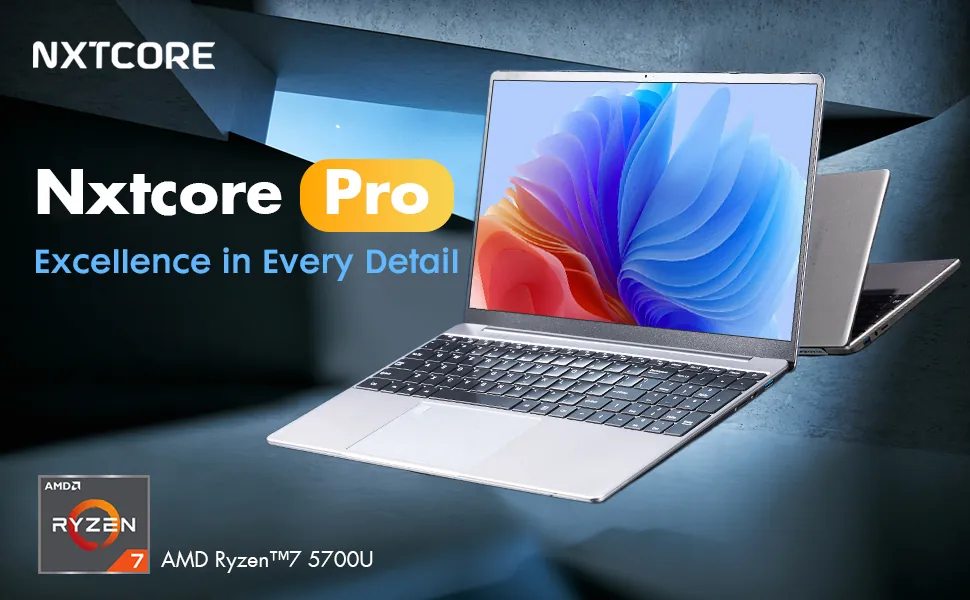
NXTCORE Ultra GLT163Max — Best Overall Performance
The NXTCORE Ultra GLT163Max ($899) delivers flagship performance with an Intel Core i9-12900H (14 cores, 20 threads), 32GB of DDR4 RAM, a 1TB NVMe SSD, and a dedicated NVIDIA GeForce RTX 3060 GPU driving a 2K QHD 144Hz display. In published benchmarks, the i9-12900H is a strong multi-core performer that rivals pricier machines.
For content creation, a CPU, GPU, and memory pairing like this is well suited to 4K video export in Premiere Pro, multi-stream editing in DaVinci Resolve, and GPU-accelerated rendering in Blender via its RTX 3060 — with performance that independent reviewers rate highly for the price.
The 32GB of RAM supports serious multitasking: running multiple virtual machines, editing 4K video while renders run in the background, and processing large datasets in Python or R. It's the closest thing in the lineup to a portable desktop replacement.
It suits video editors, 3D artists, software developers working with large codebases, data scientists running models locally, and anyone needing desktop-replacement performance in a portable form factor.
Dell XPS 15 9520 — Premium Alternative
Dell's XPS 15 9520 (Intel Core i7-12700H, 16GB RAM, 512GB SSD) offers superior build quality with an aluminum chassis, an available 3.5K OLED display, and Dell's premium support. On paper, multi-threaded performance trails 32GB configurations due to its smaller memory.
The OLED display benefits color-critical work — professional photo editing, video color grading, and print design. Independent reviews praise the screen but note you pay a premium for less RAM and storage. Choose it if display quality and build feel matter more than raw specs.
Laptop Specs That Actually Matter in 2026
Understanding laptop specifications helps you avoid paying for features you don't need while ensuring adequate performance for your workload. Here's what each spec actually means for daily use.
Processor (CPU): The Performance Foundation
The processor determines how quickly your laptop completes tasks. Intel Core i3/i5/i7 and AMD Ryzen 3/5/7 represent increasing performance tiers. For basic work (web browsing, documents, email), Intel N-series or entry chips suffice. For multitasking and demanding work, an i5/Ryzen 5 is the minimum. Content creation needs i7/Ryzen 7 or higher.
Core count matters for multitasking: 4 cores handle everyday use, 6–8 cores suit content creation, and 12+ cores target professional workloads. Clock speed (GHz) indicates single-core performance — important for apps that don't use many cores. For detailed processor explanations, see our complete specs guide for beginners.
RAM: Multitasking Capability
RAM determines how many applications you can run at once without slowdowns. 4GB: minimal — web browsing with few tabs. 8GB: comfortable for most users — many tabs, Office apps, streaming, light photo editing. 16GB: power-user territory — heavy multitasking, content creation, casual gaming. 32GB+: workstation level — video editing, 3D rendering, virtual machines, large datasets.
For an in-depth analysis of RAM requirements, read our guide on how much RAM you actually need.
Storage: Speed vs Capacity
SSD storage provides dramatically faster boot times and app loading than traditional hard drives. 128GB: tight for most users. 256GB: minimum comfortable amount. 512GB: the sweet spot for apps, files, and photos. 1TB+: for content creators storing large video files or extensive photo libraries locally.
NVMe SSDs (standard in modern laptops) load apps in seconds and boot in 10–15 seconds. SATA SSDs still outperform hard drives significantly. Never buy a laptop with HDD storage in 2026 — the performance penalty isn't worth any cost savings.
Display: Size, Resolution, and Panel Type
Screen size affects portability and workspace. 13–14 inches: maximum portability. 15–16 inches: a balanced choice for extended use. 17+ inches: desktop replacement, heavy and less portable.
Resolution determines sharpness. 1366×768: outdated, avoid. 1920×1080 (Full HD): the current standard. 2560×1440 (QHD) or higher: premium for creative work and media.
Panel type affects color accuracy and viewing angles. TN panels: cheap, poor angles. IPS panels: the standard for quality laptops. OLED panels: premium, with perfect blacks and vibrant color but a higher price.
Battery Life: Real-World Expectations
Manufacturer battery claims often exceed real-world results by 20–30%. As a general rule, expect 6–8 hours for productivity on budget to mid-range laptops. Performance laptops typically deliver 4–6 hours with mixed use, dropping to 3–4 hours under sustained load. Lightweight ultrabooks can reach 10+ hours with light use.
Battery capacity measured in watt-hours (Wh) offers an objective comparison. 40–50Wh: budget laptops, 6–7 hours typical. 60–70Wh: mid-range, 7–9 hours typical. 80Wh+: premium/performance, 8–12 hours with light use.
How to Choose the Right Laptop for Your Needs
Choosing the best laptop means matching specs to your actual usage patterns, not marketing claims or future-proofing assumptions. Here's a practical decision framework.
Step 1: Define Your Primary Use Case
Identify what you'll spend 70%+ of your laptop time doing. Basic productivity: any laptop with 8GB RAM and an SSD works. Remote work with multitasking: 12–16GB RAM, i5/Ryzen 5 or better. Content creation: 16GB+ RAM, i7/Ryzen 7. Gaming: focus on GPU and processor, 16GB RAM minimum. Student work: balance portability with performance — 8GB RAM, good battery life, lightweight.
Step 2: Set a Realistic Budget
Budget laptops ($150–300): basic tasks, web-based work, streaming, documents. Value range ($300–600): comfortable performance for most users and entry-level content creation. Performance range ($600–900): powerful processors and ample RAM for demanding work. Premium ($900+): flagship specs and premium build.
For budget-conscious buyers, see our comprehensive guide to best budget laptops in 2026.
Step 3: Prioritize Must-Have Features
List your non-negotiables: screen size, battery life, weight, ports (USB-C, HDMI, SD card), keyboard quality, and operating system (Windows vs Chromebook).
Avoid paying for features you won't use — a touchscreen adds cost but mainly benefits creative or tablet-mode use. High refresh-rate displays matter for gaming but drain battery for productivity. Dedicated graphics add cost but sit idle if you're not gaming or editing.
Step 4: Consider Form Factor Trade-offs
Traditional clamshell laptops offer the best value and performance. 2-in-1 convertibles add versatility for note-taking and media but cost 20–30% more for similar specs. Detachable tablets sacrifice keyboard quality and processing power for maximum portability.
For a detailed comparison of form factors, read our analysis on laptops vs tablets for work and school.
Step 5: Research Before Buying
Check user reviews from people with your use case. Verify warranty coverage and support options — budget brands often lack service infrastructure. Compare real-world battery life from multiple sources, since manufacturer claims inflate numbers. Check upgrade options — some laptops allow RAM or storage upgrades, others use soldered components.
For a complete purchasing guide, see our article on how to buy a laptop online in 2026.
NXTCORE vs Major Brands: Honest Comparison
NXTCORE aims to deliver more specs per dollar than established brands by selling direct and cutting retail overhead. Here's how it compares across the factors that matter.
Performance and Value
NXTCORE's direct-to-consumer model means you often get more RAM and storage for your money than on a comparably priced mainstream laptop. The lineup spans $179 to $899, averaging about $396, with mid-range configurations that pack 16GB of RAM and a 512GB SSD.
On paper, that specs-per-dollar advantage is the core of the value proposition — trimming retail markup rather than cutting corners. The NXTCORE Pro 1030NG7 ($369), for instance, offers a configuration that mainstream brands typically price higher.
Build Quality and Design
Major brands offer premium build materials at premium prices — Dell's XPS series uses aluminum unibody construction, and HP's Spectre features gem-cut edges. NXTCORE laptops use plastic chassis with internal reinforcement — functional rather than luxurious.
For buyers who prioritize specs over aesthetics, that's a fair trade. If you need a laptop that looks premium in client meetings, established brands justify their premium. NXTCORE focuses on function — solid and durable without design flourishes.
Support and Warranty
NXTCORE provides a standard 1-year warranty with email support. Major brands offer larger service networks — Dell and HP provide next-business-day replacement options, Lenovo operates service centers nationwide, and Apple offers in-person support.
That's the main trade-off: NXTCORE offers strong specs at lower prices with a leaner support setup, while major brands charge more but include broader support. For individuals and small teams comfortable with basic troubleshooting, NXTCORE works well; large organizations needing guaranteed rapid replacement may prefer established brands.
Brand Recognition and Resale Value
Dell, HP, Lenovo, Apple, and ASUS tend to command higher resale values thanks to brand recognition. This matters if you upgrade frequently and sell used equipment.
However, a lower initial price often results in a similar net cost of ownership. A laptop that costs less up front can be cheaper overall even if it retains a smaller share of its value — so weigh purchase price and resale together, not in isolation.
Where to Buy Laptops Online in 2026
Direct-to-consumer brands like NXTCORE sell mainly through their own websites, keeping prices lower by eliminating retail overhead. Major brands sell through their sites plus retailers (Amazon, Best Buy, Walmart, Newegg). Each channel has different advantages.
Manufacturer websites provide the best warranty support and newest models but rarely discount. Amazon offers fast shipping and easy returns, though prices usually match or exceed manufacturer sites. Best Buy allows in-person inspection but carries limited configurations. Refurbished marketplaces save 30–50% but often reduce warranty coverage.
For detailed buying advice, see our guide on where to find affordable laptops for sale.
Frequently Asked Questions
What is the best laptop brand in 2026?
No single brand dominates every category. Dell and HP excel in business laptops with strong support networks. ASUS and Acer are known for gaming laptops with capable cooling. Apple leads premium ultrabooks with MacBooks. NXTCORE focuses on value in budget and mid-range categories with strong specs-per-dollar. Choose based on your priorities: support infrastructure for businesses, gaming features for gamers, and specs for budget-conscious buyers.
How much should I spend on a laptop?
Budget $250–350 for basic productivity. Spend $400–600 for comfortable multitasking and moderate workloads. Invest $700–900 for performance needs like content creation. Go higher only if you need flagship specs or premium build. Most users find the $400–600 range offers the best balance of performance and value.
Are cheap laptops worth buying?
Modern cheap laptops ($200–300) deliver adequate performance for everyday tasks — far better than budget laptops from a few years ago. They work well for web browsing, streaming, documents, email, and video calls, but struggle with heavy multitasking, content creation, and gaming. Buy them for basic needs with realistic expectations. For specific examples, see our roundup of the best cheap laptops.
Should I buy a Chromebook or Windows laptop?
Chromebooks work best for users who live in web browsers — Google Workspace, cloud storage, web apps — offering good battery life and fast boot times but fewer native applications. Windows laptops provide universal software compatibility, including desktop apps and PC games. Choose a Chromebook if your work lives in the browser; choose Windows if you need specific desktop software or offline work. Read our detailed Chromebook vs Windows laptop comparison for recommendations.
Do I need 16GB of RAM or is 8GB enough?
8GB of RAM suffices for basic productivity — 10–15 browser tabs, Office apps, email, streaming, light photo editing. You'll notice slowdowns when running many apps at once or working with large files. 16GB provides comfortable multitasking and casual gaming. Power users and content creators benefit from 32GB+. For most people, 12–16GB is the sweet spot between price and performance.
What's better for gaming — laptop or desktop?
As a general rule, desktop PCs deliver more gaming performance per dollar and are easier to upgrade and cool. Laptops, however, provide portability — critical for students, travelers, or anyone without dedicated desk space. Gaming laptops make sense when portability matters; a desktop is the better value if it stays in one place.
Can I upgrade RAM or storage in my laptop later?
Some laptops allow RAM and storage upgrades through removable panels; others use soldered components that can't be changed. Before buying, check the manufacturer's specifications or teardown guides. Many NXTCORE models include accessible storage, while most ultrabooks and MacBooks use soldered parts. If you plan to upgrade, verify options first — it's often cheaper to buy higher specs up front than to upgrade later.
What ports do I actually need on a laptop?
Essential ports: USB-A for legacy devices, USB-C for modern peripherals and charging, HDMI for external displays, and a headphone jack. Useful additions: an SD card reader for photographers, Ethernet for wired internet, and multiple USB ports. USB-C with DisplayPort or Thunderbolt support enables high-resolution monitors and docking stations. Check your existing peripherals and make sure the laptop includes compatible ports.
Final Recommendations: Finding Your Best Laptop
The best laptops in 2026 match specs to real needs without paying for unused features. For most users, the NXTCORE Pro 1030NG7 ($369) delivers the best overall value — enough power for demanding productivity, ample RAM and storage, and fair pricing. Budget shoppers find exceptional value in the NXTCORE Lite F146-4105 ($179) for basic computing needs.
Casual gamers should consider the NXTCORE Pro G1568-R7 ($459) for budget-friendly esports performance, while serious gamers and content creators get a dedicated RTX 3060 in the NXTCORE Ultra GLT163Max ($899). Students benefit from the portable NXTCORE Flex S140N ($329) with all-day battery life and comfortable typing.
Avoid overspending on brand names when direct-to-consumer options deliver better specs. Skip features like touchscreens unless you'll use them. Prioritize RAM and SSD storage over raw processor specs for most productivity work. And buy from retailers with good return policies — testing a laptop for 7–14 days reveals more than any review.
The laptop market in 2026 offers excellent options across every price range and use case. With a clear understanding of your needs and a realistic budget, you can find a laptop that delivers years of reliable performance without compromise.